
De-identify Clinical Documents
in 30 Seconds.
Use AI More Safely. Stay in Control of Your Data.
MedPrivacy automatically removes personal information from NDIS clinical reports so you can safely use ChatGPT and Claude for documentation — while reducing privacy and compliance risk.
100% local processing · Nothing uploaded. Nothing shared
Always review before using AI
The Privacy Problem Every
NDIS Practitioner Faces
You want to use AI to help write reports, synthesise clinical evidence, and reduce documentation time. But every report you receive contains your participant's name, address, NDIS number, and family details.
Uploading that to ChatGPT or Claude without removing the personal information first is a breach of the Privacy Act 1988 and your NDIS obligations.
Manual de-identification takes 15 to 60 minutes per document and humans still miss things. A name in a footer. A phone number in a signature block. A parent's name buried in the body text.
There is a better way.
What practitioners deal with daily
60–80 minutes of manual redaction per batch of reports before you can even start the AI-assisted writing
Human error — names in footers, phone numbers in signatures, parent names throughout body text that are easy to miss
Privacy Act 1988 obligations and NDIS privacy requirements that make uploading unredacted documents a compliance risk
What MedPrivacy Does
A desktop application that runs entirely on your computer. No cloud. No subscriptions to services that hold your data. No technical knowledge required.
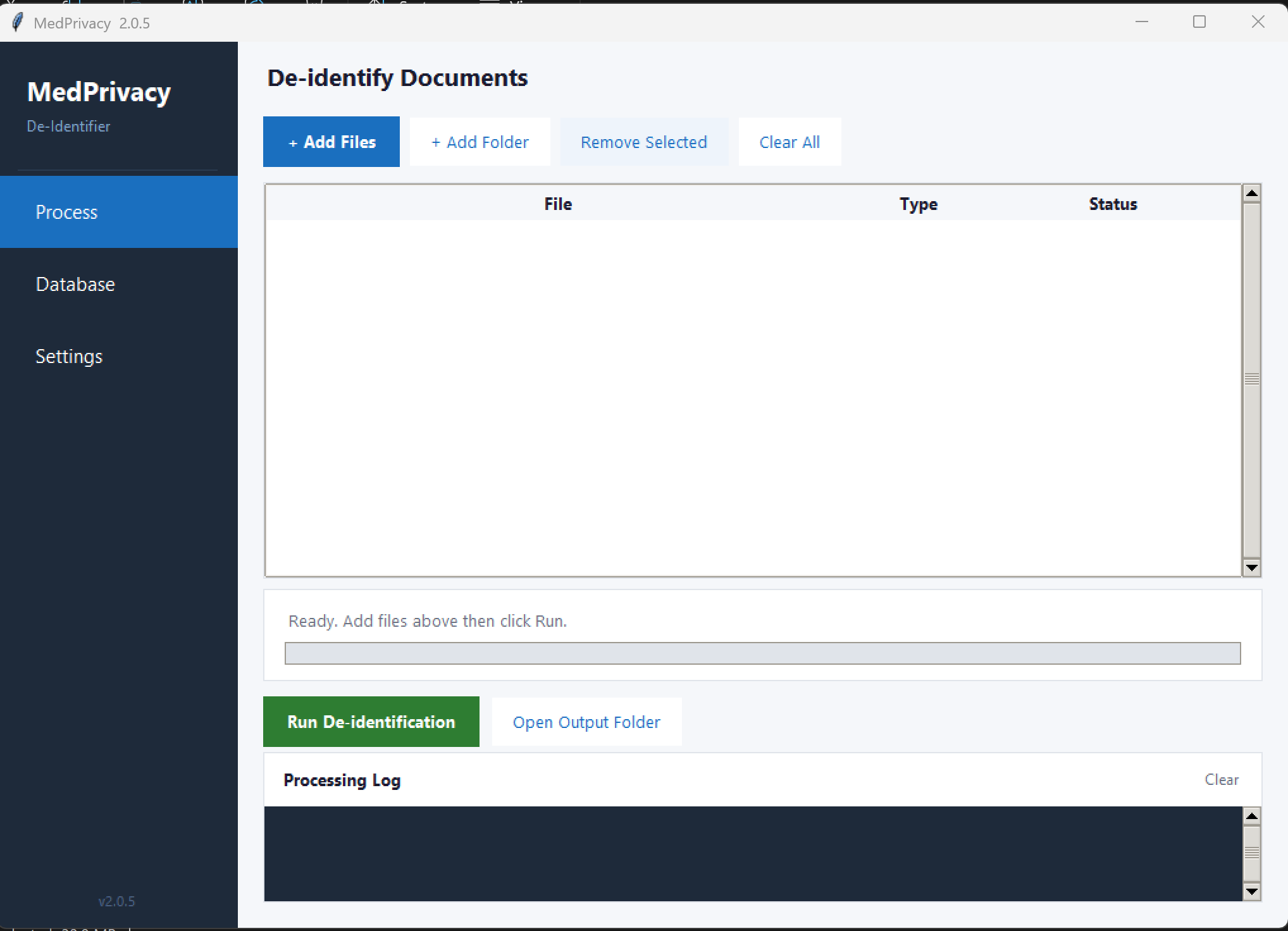
MedPrivacy v2.0.5 — Process tab. Add files, click Run, open your De-identified folder.
Removes Personal Information
Detects and replaces names, addresses, NDIS numbers, phone numbers, emails and dates of birth with privacy tags like [NAME] and [NDIS]. Clinical content is preserved completely.
Runs Entirely on Your Computer
No cloud uploads. No third-party servers. Your documents never leave your machine. 100% local processing, every single time. No internet connection required during processing.
30 Seconds Per Document
Process a single report or an entire folder at once. A batch of four clinical reports takes under a minute. De-identified files are saved automatically in a separate subfolder.
No Technical Knowledge Required
A clean desktop application. No command line. No setup beyond a one-time database import.
Open MedPrivacy
Double-click MedPrivacy.exe. A clean desktop app opens with Process, Database and Settings tabs. No installation required.
Add Your Documents
Click Add Files to select one document, or Add Folder to load an entire folder at once. Supports PDF, Word and Text files.
Run De-identification
Click Run. Watch each file turn green. De-identified files land automatically in a separate De-identified subfolder. Right-click any file to open its folder directly.
Comprehensive Detection.
Zero Manual Work for Common Identifiers.
The core engine handles pattern-detectable information automatically. Your database handles everything else — and you only set it up once.
Detected Automatically
No setup required. Detected in every document.
Add to Your Database
One-time setup. Two minutes. Used in every document thereafter.
Import your existing client list from any CRM via CSV in one click.
MedPrivacy processed all four reports in 45 seconds. I uploaded the de-identified versions to Claude with the NDIS guidelines and a report template. The AI drafted a comprehensive submission in around ten minutes.
I then spent 45 to 60 minutes verifying every citation, every clinical claim, and every recommendation before submitting. The AI got the synthesis right but cited incorrect clause numbers in one section — exactly the kind of thing you have to check. Total time: two hours versus six to eight hours the traditional way. Privacy protected throughout."
Soft Launch — Special Pricing Available
MedPrivacy is currently in soft launch and we are working directly with early adopters to find the right fit. Get in touch and we will tailor a plan for your practice.
Solo Practitioner
For individual allied health practitioners
- Full PII detection engine
- Client database management
- PDF, DOCX and TXT support
- Email support
- 30-day free trial included
Small Practice
For practices with 2 to 5 practitioners
- Full PII detection engine
- Shared client database
- PDF, DOCX and TXT support
- Priority email support
- 30-day free trial included
Practice Group
For groups with 6 or more practitioners
- Full PII detection engine
- Shared client database
- PDF, DOCX and TXT support
- Phone and email support
- 30-day free trial included
Frequently Asked Questions
Everything you need to know before getting started.
MedPrivacy performs de-identification by removing direct personal identifiers from documents and processes everything locally on your computer with no cloud uploads. Users remain responsible for assessing whether de-identified documents meet their specific privacy, ethics, and regulatory requirements. For research purposes, consult your ethics committee. For clinical purposes, follow your organisation's privacy policies.
No. MedPrivacy runs entirely on your local computer. Documents are never uploaded to any server. All processing happens on your machine and your machine only. No internet connection is required during document processing.
MedPrivacy supports PDF, Word documents (.docx), and plain text files (.txt). For best results with PDFs, ensure the text is extractable rather than a scanned image. If your PDF is scanned, run it through OCR software first.
NDIS reports frequently mention parents and family members by name throughout the document body, not just in the header. MedPrivacy includes Carer as a specific entry type in the database, so parent and guardian names are detected and redacted alongside participant and provider names. This was a deliberate design decision based on real-world NDIS documentation patterns.
Yes. Export your client list from your practice management software or CRM as a CSV file and import it into MedPrivacy in one click. The CSV requires two columns: Type (Participant, Carer, Provider, Organization, or Location) and Name. This makes initial setup very fast for practices with existing client databases.
De-identification removes direct personal identifiers such as names, contact details, and ID numbers. Anonymisation is a higher standard that also addresses indirect identifiers and statistical re-identification risk. MedPrivacy performs de-identification, which is suitable for clinical supervision, professional development, case discussions, and AI-assisted documentation workflows. For research requiring full anonymisation, additional measures and ethics approval may be required.
Yes, always. De-identification significantly reduces the risk of inadvertent disclosure but verification remains your professional responsibility. In practice, this means opening the de-identified file, scanning for any missed names or identifiers, and checking that the clinical content reads correctly before uploading to any AI tool. AI tools can also introduce errors in their outputs — always verify AI-generated content before submitting to NDIA or sharing externally.
MedPrivacy is designed for individual allied health practitioners and small to medium practices in the Australian NDIS sector. Enterprise environments with complex governance requirements, data pipelines, or audit trail obligations should contact CollabEdge Solutions to discuss a tailored solution.
Start De-identifying in
the Next 10 Minutes
Download MedPrivacy, add your first client to the database, and process your first document. The whole setup takes less than ten minutes.